IV Help Guide

Rich Text Editor (RTE)
Welcome to our tutorial on managing our robust Rich Text Editor widget. Rich Text areas are called Rich Text because they can contain both text, images, and video. This allows you to great freedom in designing your web page, and defining how the content is to be displayed. To begin click the arrow next to a topic below and our visual guide will appear. To advance to the next step simply click the next button inside the appropriate box.
- Move your mouse over the text you would like to edit. The text will highlight in orange and the Hover Menu will appear.
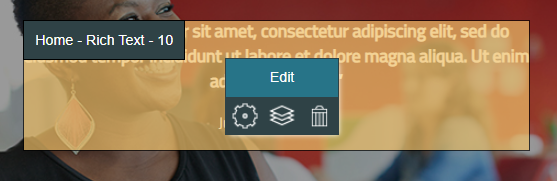
- Click Edit
- The Rich Text Editor widget will open.
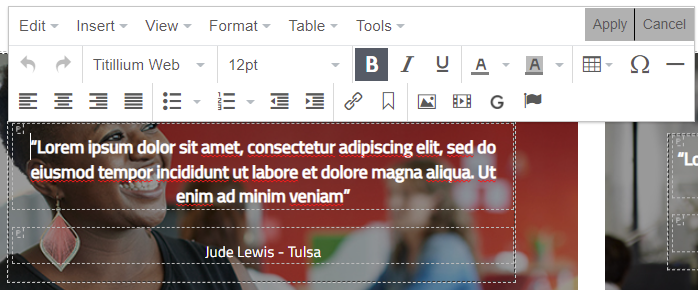
- You can add and delete text directly by typing into it. After making any changes, click Apply to save them to the page. While the Rich Text Editor is open, you can edit any other RTE on the page by clicking into its text.
- Edit
 - The Edit menu has the following options:
- Undo - Reverts the most previous change.
- Redo - Restores the most recent change you've used Undo on.
- Cut
- Copy
- Paste
- Paste as text - Adds the text you've most recently used Cut or Copy on, but without any of it's size/color formatting.
- Select all
- Find and replace
- Insert
 - The Insert menu has the following options:
- Insert/edit link
 - Adds a link to the selected text or image. You can choose to link to a New Page, Existing Page, URL, Email, Existing File, or New File.
- Insert/edit video
 - Allows you to choose a video file from the File Manager and add it to the spot your cursor is placed.
 - Insert/edit image
 - Allows you to choose an image file from the File Manager and add it to the spot your cursor is placed.
 - Special character
 - Opens a chart of special characters to select from. The selected character is added to the spot your cursor is placed.
 - Horizontal line
 - Places a horizontal line where your cursor is placed. This line will span the width of the RTE.
 - Anchor
 - Places an invisible anchor on the page. This anchor can be linked to to bring visitors directly to this spot on the page.
 - Page break - Adds an invisible Page break on the page. This denotes where a new page should start when someone is printing the page.
- Insert date/time - Allows you to add the date or time to the page in one of four formats.
- Nonbreaking space - Adds a space to the page, but doesn't allow the line to wrap at that space.
- Insert/edit link
- View
 - The View menu has the following options:
- Show invisible characters
- Show blocks
- Visual aids
- Format
 - The Format menu has the following options:
- Bold

- Italic

- Underline

- Strikethrough
- Superscript
- Subscript
- Formats - This wraps the text in HTML tags, pulling appearance settings from browser defaults and your web site's Properties. The default format is Paragraph. We recommend using these formats, as you can often save time by applying settings in Properties instead of to individual pieces of text.
- Clear formatting - Removes any formatting from the selected text
- Bold
- Format
 - The Table menu has the following options:
- Insert table - Adds a table with up to 10 rows x 10 columns
- Table properties - Controls the table's width, height, cell spacing, cell padding, border width, alignment, border color, and background color.
- Delete table
- Cell - Allows you to edit the current Cell's properties, merge multiple cells, or split merged cells back into individuals.
- Row - Allows you to insert new rows, delete the current row, cut/copy/paste rows, and edit row properties.
- Column - Allows you to insert and delete columns.
- Tools
 - The Tools menu has the following options:
- Source code - Allows you to view and edit the HTML code of the current RTE.
- Google fonts - Allows you enter and save up to three Google Fonts for use throughout your site.
- Undo
 - Reverts the most previous change.
 - Redo
 - Restores the most recent change you've used Undo on.
 - Font Family

- Bold
- Italic
- Underline
- Text color

- Background color

- Table
 - Adds a table with up to 10 rows x 10 columns
 - Special character - Opens a chart of special characters to select from. The selected character is added to the spot your cursor is placed.
- Horizontal line - Places a horizontal line where your cursor is placed. This line will span the width of the RTE.
- Align left

- Align center

- Align right

- Justify

- Bullet list

- Ordered list

- Decrease indent

- Increase indent

- Insert/edit link - Adds a link to the selected text or image. You can choose to link to a New Page, Existing Page, URL, Email, Existing File, or New File.
- Anchor - Places an invisible anchor on the page. This anchor can be linked to to bring visitors directly to this spot on the page.
- Insert/edit image - Allows you to choose an image file from the File Manager and add it to the spot your cursor is placed.
- Insert/edit video - Allows you to choose a video file from the File Manager and add it to the spot your cursor is placed.
- Google fonts
 - Allows you enter and save up to three Google Fonts for use throughout your site.
© 2022 4.0 Help Guide